


MAGNA Software
Introducing Magna:
Elevate Multi-Camera Management, Ensure Security.
Choose Magna Software
Elevate your monitoring and management capabilities across diverse domains with Magna Software by BZBGEAR –
the epitome of precision in camera monitoring, management, and control. Seamlessly integrating with all BZBGEAR cameras,
notably the BG-Nutrix, Magna enhances various applications, from meticulous patient monitoring in medical facilities to conferencing, broadcasting, live streaming, video production, and security setups.

Crafted to empower you, Magna provides precise control over pan, tilt, zoom, and audio functions. Effortlessly navigate setup and management sections, ensuring peak performance tailored to your requirements.
Professionally manage large-scale multicamera setups with Magna, using the location configuration settings to label and divide cameras by unit, department, floor, and room. From privacy settings that safeguard sensitive information to user configurations customizing access permissions,
Magna ensures robust security across all applications. Whether orchestrating a medical symphony, conducting a virtual conference, producing captivating live streams, or ensuring facility security, Magna Software delivers innovation with unparalleled reliability.
THE PALTFORM
Overview
Setting Up and Management
Accessing and Adding Your Cameras
- Camera Identification: Easily identify and access connected cameras on the local area network. Name each camera and specify its location in the building for streamlined organization.

Get started today and unleash
the true potential of your PTZ camera.
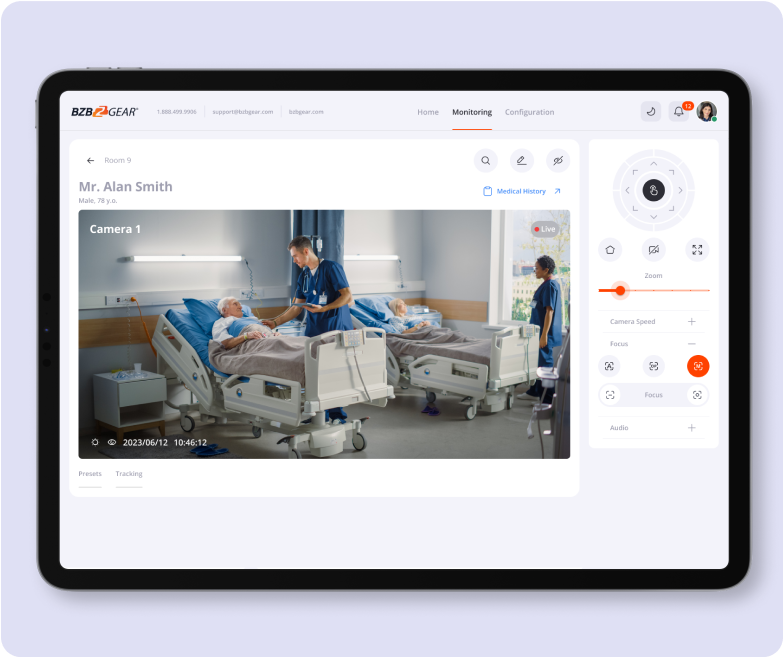
Monitoring
Effortlessly monitor video and audio feeds. Adjust audio input and output levels based on camera specifications.
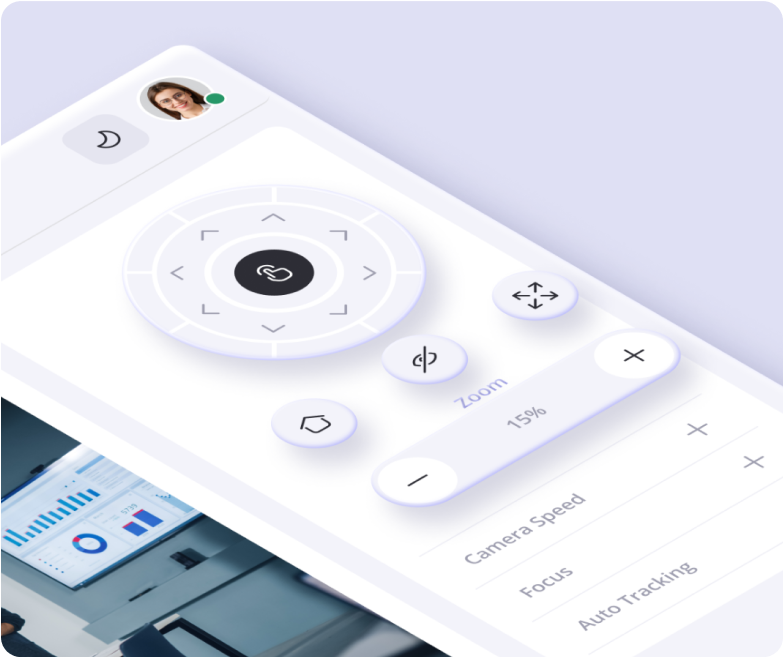
Pan, Tilt, and Zoom
Seamlessly control pan, tilt, and zoom functions from the intuitive control panel. Enjoy flexible 360-degree rotation and adjustable zoom levels at the click of a button.
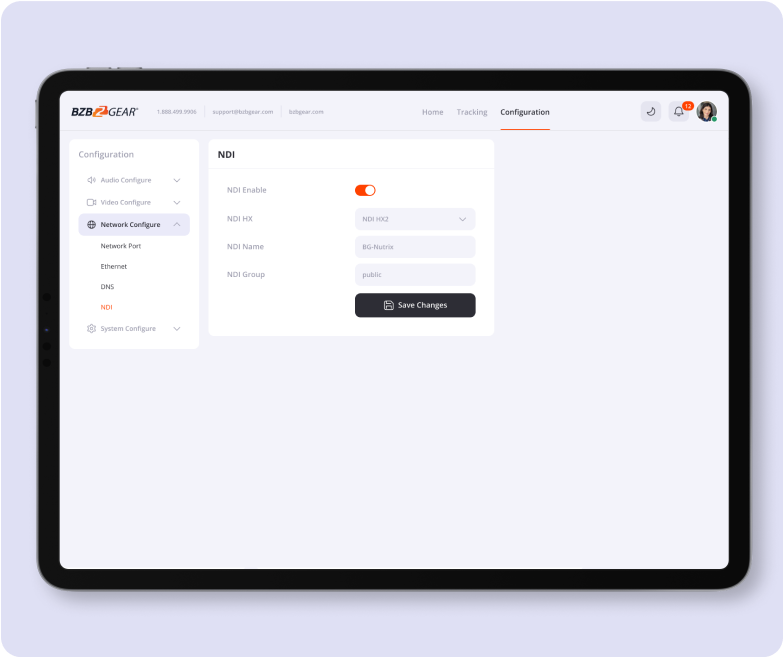
Network-Based Video Feeds via NDI
Leverage network-based video feeds via NDI for enhanced connectivity and data transmission.
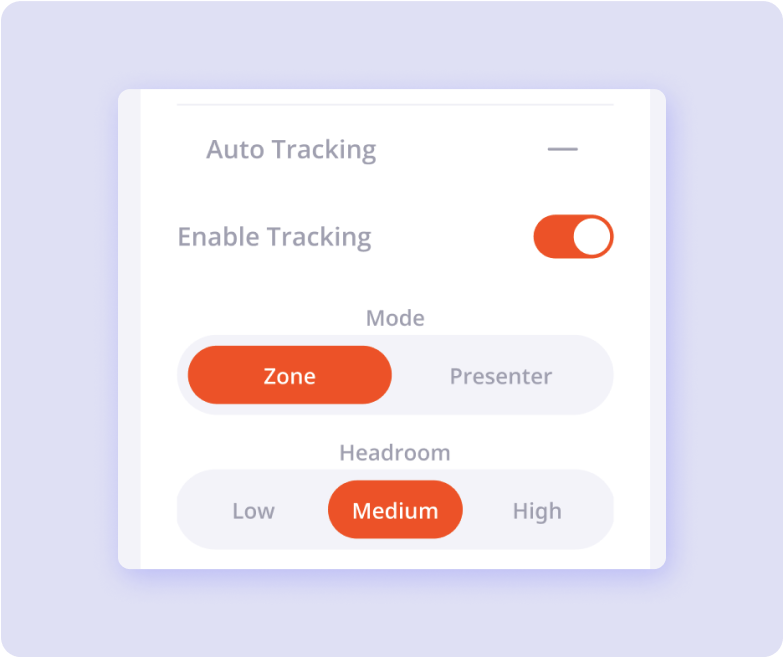
Auto Tracking
Enable or disable auto-tracking with a single click.
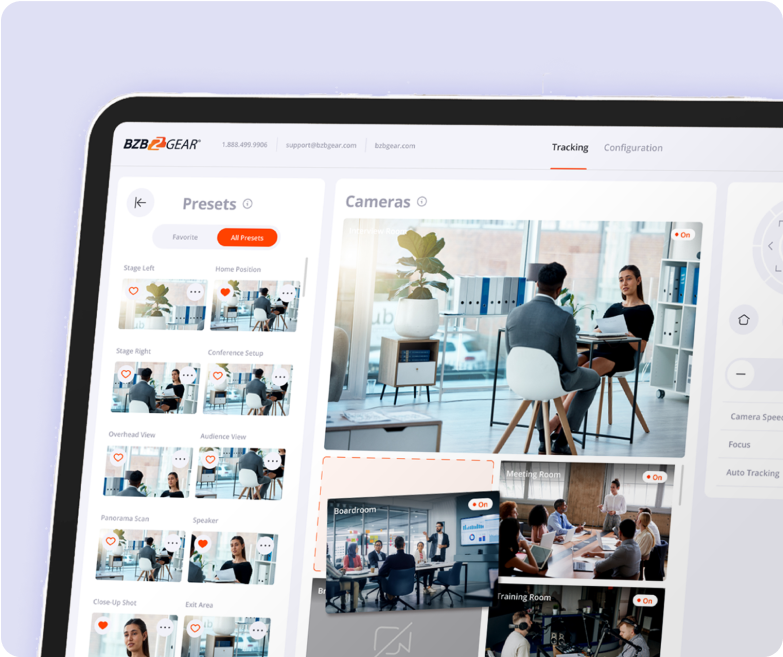
Presets
Save and recall preferred configurations with preset functionalities, including camera angles, zoom levels, focus settings, and speed.
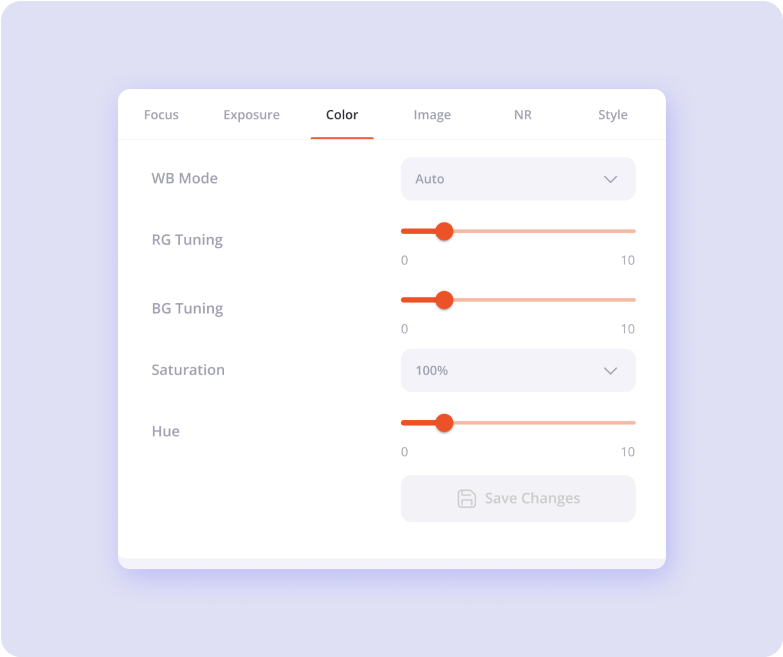
Image Settings
Fine-tune focus, exposure, color, and other image parameters in the video parameters tab.

Security and Administration
- Privacy Settings: Maintain control over privacy settings to safeguard sensitive information. Enable privacy mode to blur images during monitoring, ensuring confidentiality until disabled.


Location Configuration
Organize connected cameras by assigning specific units, departments, floors, and rooms. Streamline management by categorizing and accessing cameras by location.

User Configuration
Establish individual logins and settings for users based on their roles: User, Admin, and Manager. Ensure efficient administration and security enforcement within your organization.

Permissions Configuration
Administer camera access permissions for each user, enhancing security and control. Tailor access levels to specific cameras, providing flexibility and oversight for different user roles.
How Magna is Used In Your Industry
Patient Monitoring
Everything you need for efficient inpatient & outpatient monitoring

Better Communication& Diagnoses
The power speaker and mic, integrated into the dock, can be easily detached and located strategically to enhance the quality of communication
Enable auto-tracking on the camera remotely if you need your patient to be active during the remote consultation.
The 4K60 video quality and 30X optical zoom ensure you and your patient are getting an accurate assessment

24/Hr monitoring
The integrated IR night vision technology allows for clear and secure monitoring of patients through the night without disturbance

Enhanced Security and Data Backup
The BG-NUTRIX is equipped with multiple security and safety-enhancing features. To enhance the physical security of the camera, the Kensington Security Slot is integrated. Activate the active recording feature and keep track of important consultations using the integrated memory card slot. The IEC 60601 medical certification ensures that the camera meets safety standards for medical environments
Conferencing
Streamlining Conference Room Management: An Innovative App-Based Approach for Administration and Monitoring
A Simple Way to Access and Manage Multiple IP Cameras
- Accessing and Managing: Cameras in conference rooms is made easy with features like camera identification and location configuration. Users can monitor video and audio feeds, control camera movements, and save presets for quick setup. Auto-tracking and network-based video feeds enhance the conference experience. Fine-tuning image settings ensures high-quality video feeds for participants, promoting effective communication and collaboration.
Advanced and Intuitive Security and Administration
- User Configuration: Magna Software offers privacy settings such as Privacy Mode, which blurs images for confidentiality during monitoring. User configuration includes establishing individual logins and permissions, ensuring accountability and security. With Magna, businesses can efficiently manage conference setups, ensuring smooth operation, high-quality video feeds, and robust security for sensitive discussions.

Broadcasting
Magna by BZBGEAR offers a comprehensive solution for managing multi-camera setups in broadcasting applications with precision and security.
- Camera Management and Identification: Magna simplifies camera management on the local network, enabling easy identification and access. Users can name and locate cameras within the studio for organized management.
- Monitoring and Control: With Magna, users can monitor multiple cameras feeds in real-time, controlling pan, tilt, and zoom for dynamic broadcasts. Preset functions allow quick angle transitions while auto-tracking follows subjects seamlessly. Network-based video feeds enhance connectivity.
- Image Optimization: Magna enables users to adjust focus, exposure, and color for optimal broadcasting picture quality.
- Security and Administration: The software ensures content privacy with image blurring and organizational features. Administrators can set user roles and permissions tailored to broadcasting team needs, ensuring secure access and oversight.

Optimize each shot directly from the interface

Live streaming
Magna Software offers a comprehensive suite of features designed to enhance live-streaming applications in various domains.

- Multi-Camera Management: Magna simplifies the management of multiple cameras in a live-streaming environment. Users can easily identify and access connected cameras on the network, name each camera, and specify its location for streamlined organization.
- Monitoring and Control: Magna provides users with effortless monitoring of video and audio feeds. With intuitive controls, users can adjust audio input and output levels and seamlessly control pan, tilt, and zoom functions. Preset functionalities allow users to save and recall preferred configurations, including camera angles and zoom levels.
- Auto Tracking and Network-Based Feeds: The software enables users to enable or disable auto-tracking with a single click, enhancing the tracking capabilities of the cameras. Additionally, leveraging network-based video feeds via NDI improves connectivity and data transmission for a smoother live streaming experience.
- Image Settings Fine-Tuning: Magna allows users to fine-tune image settings such as focus, exposure, color, and other parameters, ensuring the perfect picture quality for live streaming.

- Image Settings Fine-Tuning: Magna allows users to fine-tune image settings such as focus, exposure, color, and other parameters, ensuring the perfect picture quality for live streaming.
- Security and Administration: Magna prioritizes security with features like privacy settings, location configuration, user configuration, and permissions configuration. Privacy settings enable users to maintain control over sensitive information by blurring images during monitoring. Location configuration allows for the organization of cameras by assigning specific units, departments, floors, and rooms, streamlining management. User configuration enables the establishment of individual logins and settings based on roles, ensuring efficient administration and security enforcement. Permissions configuration allows for the administration of camera access permissions for each user, enhancing security and control.
Perfect each shot in real-time or ahead of the show

Customize user permissions and team roles

Security setups
Magna software offers several features that significantly enhance security in various applications

Privacy Settings
The ability to maintain control over privacy settings is crucial for safeguarding sensitive information. Magna allows users to enable privacy mode, which blurs images during monitoring, ensuring confidentiality until disabled. This feature is particularly important in environments where privacy concerns are paramount, such as medical facilities or corporate boardrooms.

Location Configuration
Organizing connected cameras by assigning specific units, departments, floors, and rooms facilitates streamlined management. By categorizing and accessing cameras by location, Magna enhances security by providing administrators with better oversight and control over surveillance footage. This organization can also aid in incident response by quickly pinpointing relevant camera feeds.

User Configuration and Permissions
Magna allows administrators to establish individual logins and settings for users based on their roles, such as User, Admin, and Manager. This role-based access control ensures that only authorized personnel can access sensitive camera feeds and settings. Additionally, administrators can administer camera access permissions for each user, tailoring access levels to specific cameras. This granular control enhances security by preventing unauthorized access and ensuring that each user only has access to the information necessary for their role.
Configure
the perfect solution
Choose between main different parameters to get BZBGEAR products ideal fit to your solution.
